


Amazon Shopping
4.4350.85K Reviews
App Specs
- Version
- 32.13.0.100
- Updated On
- License
- Free
- Downloads
- 1,000,000,000+
- Developer
- Amazon Mobile LLC
- Categories
- Shopping
- Platform
- Android, iOS
Screenshots

 Analysis by AppCompare
My first-week impression of Amazon Shopping is that it makes browsing feel almost effortless: I can search for a specific item, compare options, and keep everyday errands moving without opening a laptop. That convenience is the app’s strongest first impression, but it can also turn a quick check into a long scroll. Whether it earns a permanent place on your phone depends less on the novelty and more on whether you use its tools deliberately.
From first browse to lasting habit
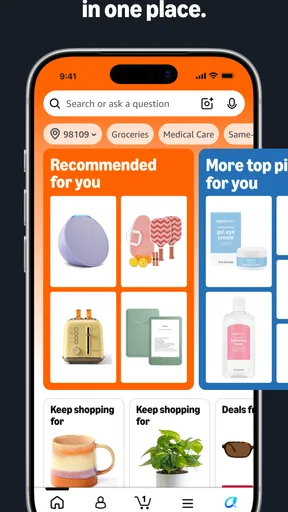
On the first few visits, the range is the obvious draw. Amazon Mobile LLC’s shopping app puts a broad mix of products in one place, so I can move from a household restock to a book or a phone accessory without switching stores. The home screen’s recommendations give me ideas, though they are not always relevant; I treat them as optional browsing rather than a reliable way to find what I actually need.
The quickest way I’ve found to make the app useful is to start with a specific need and refine the search instead of scrolling the home feed. Filters can help narrow a crowded results page, but I still check the product details and customer reviews before deciding. A polished listing is not a substitute for checking whether the item matches the exact size, model, or material I have in mind.
Guides and Analysis on Amazon Shopping
What works after the novelty wears off
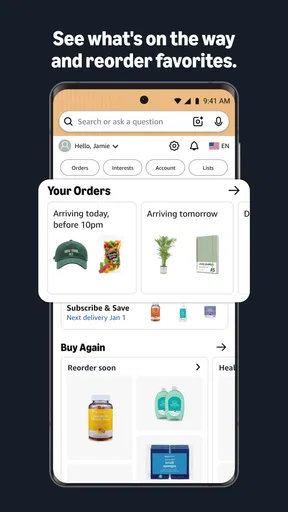
The lasting value is practical when I use the app for repeat errands: replacing a household item, checking options for a planned purchase, or keeping an eye on an order already placed. The ability to follow delivery progress is useful after checkout, because I can check the order in the same place where I bought it instead of searching through messages. Notifications can make that process easier, although I prefer to keep them focused on useful order updates rather than let every offer pull me back into browsing.
For a realistic example, imagine I notice before dinner that a pantry staple is running low and also need to replace a worn charging cable. I can search for each separately, compare the listings, and review delivery choices before buying. That is a better use of the app than adding the first appealing result to my cart. For the cable in particular, checking compatibility and the product description first can prevent a convenient order from becoming an inconvenient return.
Amazon Shopping is free to download, and its shopping focus makes sense for people who already buy from Amazon or want to browse a wide selection from a phone. It has a 4.4 average from around 4.4 million ratings and has passed 500 million installs. Those figures suggest it is a familiar option for many shoppers, but they do not guarantee that every listing or recommendation will suit my needs. The app is rated Teen, runs on Android 9 or later, and its current version is 30.22.2.100.
Useful habits, with a little restraint
One less obvious strength is being able to use different ways to identify a product. Typing works best when I know the item’s name, while scanning a barcode or taking a picture can help when I have the object in front of me but do not know what to call it. Those shortcuts are starting points, not proof that the first result is the right match. I still compare the product page against the item I intended to find.
Worth Reading Before You Choose

Baby Panda World Brings Quick Play to Modern Phones, but Its Game Library Feels Busy

ESPN’s Live Game View Makes Following Close Games Easier

QuizzLand Review: A Good Fit for Short Trivia Breaks, Not Every Player

Basketball Stars: Multiplayer Is Fast, but Can It Recover When Matches Go Wrong?

WEBTOON Turns Phone Updates Into a Better Reading Routine

Link to Windows Runs on Shared Habits, Not Social Feeds
I also try to separate research from buying. If I’m comparing a few options, I read the descriptions and reviews first, then revisit the candidates before checking out. That small pause matters in an app where saved payment details and quick purchasing reduce friction. The speed is convenient for a planned purchase, but it can make an impulse buy feel nearly as easy as adding something to a list.
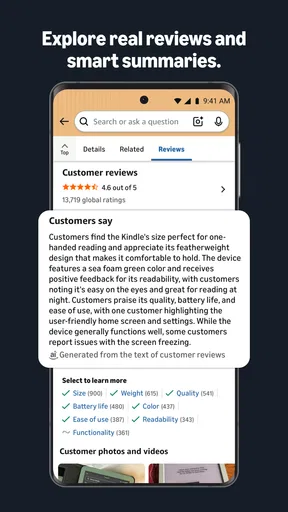
For a bigger purchase, I pay attention to the substance of reviews rather than just the overall impression. I look for comments that address the specific concern I have, such as fit, ease of use, or how an item compares with its description. Reviews can help surface practical details, but opinions are still individual experiences. When the decision depends on a precise specification, I give the product information more weight than a general thumbs-up.
How it compares with other ways to shop
Compared with visiting a single retailer’s app, Amazon’s main advantage is the breadth of its product browsing in one place. That can save time when I’m still figuring out what kind of item I want. The trade-off is that a large catalogue can make choosing harder, and a retailer focused on one product area may offer a more straightforward way to compare within that specialty. If I already know which shop or brand I want, its own app or website may be the simpler route.
Compared with using a mobile browser, the app puts searching, product pages, and order tracking into a dedicated shopping experience. That is handy for regular customers, but it is not automatically better for someone who rarely orders from Amazon. A browser may be enough for an occasional purchase, while the app is more compelling when I repeatedly check listings or delivery progress.
Prime is mentioned as an app perk, but it is not a reason to assume every shopper will get the same value from the experience. The app itself is free, while Prime membership is a separate consideration. I would decide whether that service suits my shopping habits independently, rather than treating a membership as essential just to use the app.
The maintenance cost is attention
There is little setup burden for basic browsing, but keeping the experience comfortable takes some self-control. Personalized suggestions and deal prompts can be useful when they match a real need; when they do not, they add noise. I avoid treating a discount as a reason to buy something I would not otherwise search for. The app is most helpful when it supports a shopping plan, not when it creates one for me.
Notifications are another small maintenance choice. Order updates can be reassuring when I’m waiting for a delivery, but frequent promotional interruptions may make the app feel more demanding than useful. I’d keep the alerts that help me act and quiet the ones that mainly encourage another browse. That keeps the practical part of the app available without making shopping a constant background activity.
There can also be a learning curve if someone is new to online shopping. Search results may contain many similar-looking options, and a long list is not the same as an easy decision. I recommend slowing down on unfamiliar products: check the description, look at the reviews, and make sure the listing is for the version or size you meant to buy. That habit is more valuable than tapping through the checkout quickly.
Where the experience can become tiring
The same abundance that makes the catalogue useful is also its main source of fatigue. When I do not know exactly what I want, recommendations and deal sections can keep me browsing without bringing me closer to a decision. For a focused purchase, I search directly and use filters; for casual window-shopping, I accept that the app may take more time than I planned.
Recommendations can miss the mark, and the volume of listings means I cannot assume the top result is automatically the best choice. I compare relevant details rather than relying only on placement or a quick impression. That is particularly important when there are several similar products and a small difference in model or specification matters.
Checkout’s convenience is a mixed blessing. Saved payment methods and one-click buying make a planned order quick, but they also reduce the pause in which I might reconsider an unplanned purchase. I find it useful to leave a moment between browsing and buying when I’m not sure. A little deliberate friction can be more helpful than trying to undo an impulse later.
The app includes in-app purchases listed from $0.99 to $149.99 per item. I would check what a particular purchase involves before confirming it, especially if I am only intending to browse or buy a physical product. That is a sensible habit in any shopping app: review the amount and what is being purchased at the final step.
Who will get the most from it
I’d recommend it to someone who shops on Amazon regularly, wants to compare a broad set of listings on a phone, or values checking delivery progress in the same app used to place an order. It is also handy for people who often need to identify an item from its packaging or appearance, since barcode and image search offer alternatives to remembering a product name.
I would not make it my first choice if I prefer buying from local shops, want a highly curated specialist retailer, or find recommendation-heavy browsing distracting. Someone who makes only occasional Amazon purchases may be perfectly comfortable using a browser instead. And if I need detailed advice on a specialist product, I would compare with a focused retailer or seek a more authoritative product source rather than treating a crowded marketplace listing as the final word.
As a shopping app, Amazon Shopping has an unusually broad role: discovery, comparison, checkout, and order follow-up all sit together. That makes it convenient, but it does not remove the need to judge listings carefully. I get the most out of it when I arrive with a purpose, verify the details, and use the app’s speed to complete a considered purchase rather than to browse indefinitely.
Hey there, fellow shopaholics! Today, I’m diving into the world of Amazon Shopping, an app that’s pretty much a household name at this point. Whether you're hunting for the latest gadget or just restocking your pantry, this app has got you covered. But is it all it's cracked up to be? Let’s find out!
First Impressions and Features
So, I fired up the Amazon Shopping app on my phone, and honestly, it’s like stepping into a virtual mall. The layout is super intuitive, and everything is right where you’d expect it to be. The home screen greets you with personalized recommendations, which is both super helpful and a little dangerous for impulse buyers like me!
One of the standout features has to be the search functionality. You can search by typing, scanning barcodes, or even snapping a picture of the item. The app’s AI does a pretty solid job of figuring out what you’re looking for, even if your photo skills are as shaky as mine. Plus, the filtering options are a lifesaver when you’re sifting through thousands of products.
Shopping Experience
Navigating through categories is a breeze. Whether you’re looking for electronics, books, or clothes, you’ll find well-organized sections. I was particularly impressed by the detailed product descriptions and reviews. Seeing what other users think before making a purchase is invaluable, especially for big-ticket items.
Checkout is seamless. Saved payment methods, one-click buying, and delivery options make the process almost too easy. I’ve got to say, the app’s integration with Amazon Prime is a major perk. Free shipping and exclusive deals? Yes, please!
Additional Perks
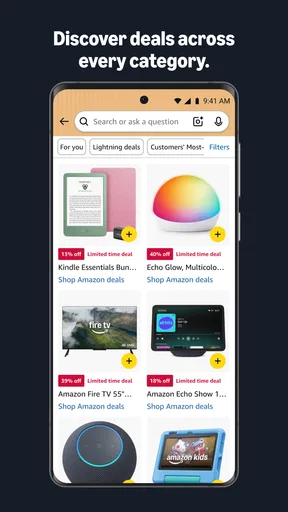
The app doesn’t just stop at shopping; it’s got a few extra tricks up its sleeve. There are daily deals and lightning offers that keep things exciting. I found myself checking in more often than I’d like to admit, just to see what new discounts were available.
Another cool feature is the ability to track your orders in real-time. No more waiting around wondering when your package will arrive. The app sends you notifications every step of the way.
What Could Be Better?
While the app is generally fantastic, there are a couple of areas where it could improve. Sometimes, the sheer volume of products can be overwhelming. It takes some getting used to, especially if you’re new to online shopping.
Also, while personalized recommendations are great, they can sometimes miss the mark. I’ve had a few "Why is this being suggested to me?" moments. But hey, no app is perfect!
Overall, the Amazon Shopping app is a versatile and reliable tool for anyone who loves online shopping. It’s packed with features that make buying easy and fun. Whether you’re a seasoned shopper or a newbie, this app is definitely worth having in your digital toolbox.
Pros
- Wide range of products available.
- User-friendly interface and navigation.
- Fast and reliable delivery options.
- Secure payment methods.
- Personalized recommendations.
Cons
- Some items may have high shipping fees.
- Product reviews can be misleading.
- Occasional app performance issues.
- Limited customer service response.
- In-app ads for other Amazon services.
FAQs for Amazon Shopping
What features does the Amazon Shopping app offer?
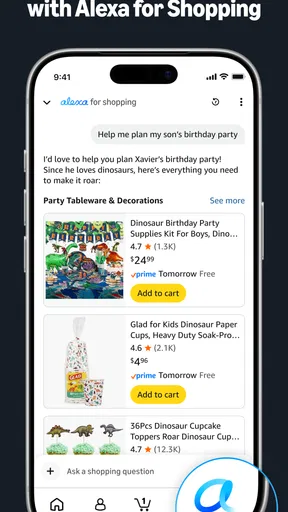
The Amazon Shopping app offers a variety of features to enhance the shopping experience. Users can browse millions of products, access personalized recommendations, and view customer reviews. The app also supports voice search, barcode scanning, and one-click ordering. Additionally, it provides tracking for your orders and options to manage your account settings easily.
Is the Amazon Shopping app free to use?
Yes, the Amazon Shopping app is free to download and use on both Android and iOS devices. However, while the app itself is free, purchasing products through the app will incur costs. Additionally, some features like Amazon Prime are subscription-based, offering benefits such as free shipping and exclusive deals.
How does the Amazon Shopping app ensure security during transactions?
The Amazon Shopping app employs multiple layers of security to protect users during transactions. It uses secure encryption to safeguard personal and financial information. Additionally, the app supports two-factor authentication for an added layer of security, and Amazon's customer service is available to assist with any security concerns or issues that may arise.
Can the Amazon Shopping app be used in all countries?
The Amazon Shopping app is available in many countries, but not all. The app’s availability and the range of products offered can vary based on the region. Users should check the app store in their country to see if the app is available and explore the specific features and services offered in their region.
What should I do if the Amazon Shopping app is not working properly?
If the Amazon Shopping app is not functioning as expected, try restarting your device or reinstalling the app. Ensure your device’s software is up to date and check for any available app updates. If problems persist, contact Amazon’s customer support for assistance. They can help troubleshoot the issue and provide guidance.


